Today at a Glance
| Phase | Time | Activity |
|---|---|---|
| 🌍 Contextualize | 5 min | Gaudí, parallel structures, why HDL is here |
| ⚠️ Reframe | 30 min | HDL ≠ software · toolchain · setup walkthrough (Day 1 only) |
| 🛠 Assemble | 65 min | LED on · buttons-to-LEDs · logic mods · flash the board |
| 🛡 Fortify | 35 min | Testbench, sim PASS/FAIL, common-pitfall sweep |
| 🔗 Transfer | 15 min | Debrief · preview Day 2 · share boards |
▸ Phase 1 of 5 · ~5 min
🌍 Contextualize
A Barcelona hook for today's concept
You're Studying HDL in Gaudí's City
Antoni Gaudí designed in parallel structures: hundreds of columns rising at once, each carrying its own load, all standing simultaneously.
Hardware description is the same discipline. You describe things that exist at the same time — not steps in a recipe.
This week in Barcelona
- Wed PM: Sagrada Família — combinational structure made of stone
- Thu: Montserrat excursion
- Next week: Semidynamics & HP Barcelona visits
▸ Phase 2 of 5 · ~30 min · Setup-heavy on Day 1
⚠️ Reframe
Sharper lens on the pre-class video + getting everyone onto silicon
⚠️ If You're Thinking Like a Programmer…
❌ Wrong Model
“HDL is just another programming language. Lines execute top-to-bottom; assign is like a variable assignment.”
✓ Right Model
HDL describes physical hardware that runs in parallel. Every assign is a wire. Every always block is a circuit that is always energized.
In hardware, everything happens at once.
Two Paths from One Source
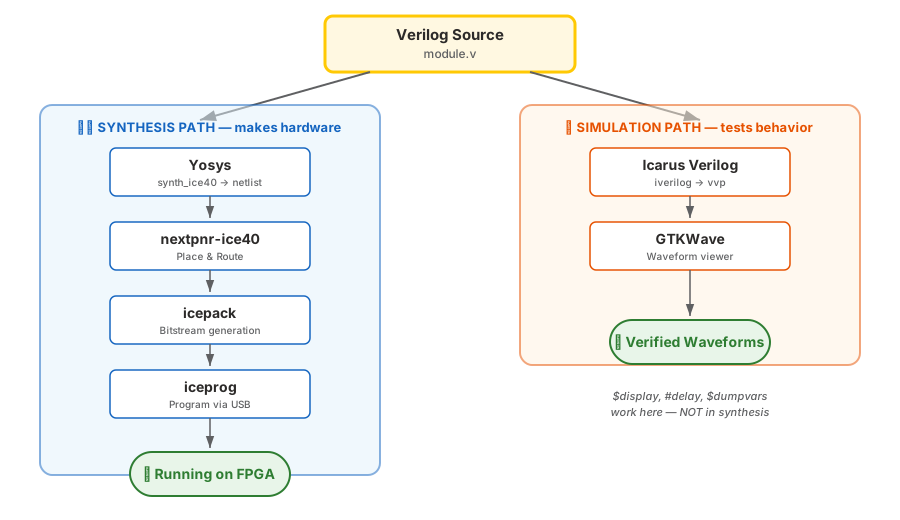
Synthesis → Hardware
yosys → nextpnr → icepack → iceprog
HDL becomes a netlist of LUTs, then a bitstream, then real logic on the iCE40.
Simulation → Software model
iverilog + vvp → optional GTKWave
HDL runs as a model. A testbench drives inputs, checks outputs, prints PASS/FAIL.
edit → make sim → fix until all pass → make prog. Simulation is where you find bugs. Hardware is where you celebrate.
Toolchain Health Check
Run these in order. Everyone gets a green line for each before lab starts.
yosys -V              # synthesis
nextpnr-ice40 --version  # place & route
icepack -h            # bitstream packer
iverilog -V           # simulation
iceprog               # USB programmer (errors w/o board — that's OK)
✓ Linux / WSL2
Usually works out of the box. WSL2 needs usbipd-win to forward the Go Board's USB.
⚠ macOS / Windows
FTDI driver may need brew install / installer. See docs/course_setup_guide.md.
Instructor at the back walks any laptop that fails — no one moves to Assemble without a working chain.
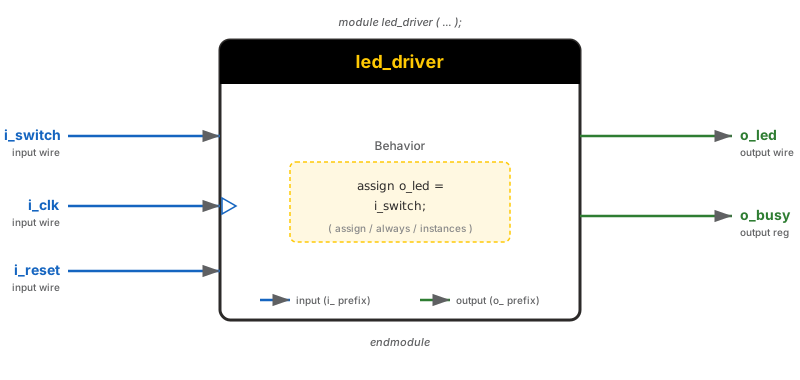
Anatomy of a Module
// led_on.v — the simplest possible design
module led_on (
    output wire o_LED_1   // a single pin on the chip
);
    assign o_LED_1 = 1'b1;  // continuously drive HIGH
endmodule- Module = chip on a board. Ports are pins, not function arguments.
assign= a wire. It is always driven, not "called.".pcffile = the soldering. Mapso_LED_1to the FPGA pin connected to LED1 on the Go Board.
▸ Phase 3 of 5 · ~65 min · You build
🛠 Assemble
Write code, run sims, flash the board
Build Plan — Three Increments
- Ex 2 · 15 min LED On — hardwire
o_LED_1 = 1'b1. Full synth → place & route → bitstream → program. First win: a lit LED. - Ex 3 · 25 min Buttons → LEDs — four
assignstatements wire each switch to its LED. First taste of multi-port modules. - Ex 4 · 20 min Logic mods — invert, AND, OR, XOR. Predict, then observe how the LEDs change.
yosys by hand again.
Live Demo Cue — One-Liner First
// Instructor types live, then runs the full flow
module led_on (output wire o_LED_1);
    assign o_LED_1 = 1'b1;
endmodule
yosys -p "synth_ice40 -top led_on -json led_on.json" led_on.v
nextpnr-ice40 --hx1k --package vq100 --pcf go_board.pcf \
--json led_on.json --asc led_on.asc
icepack led_on.asc led_on.bin
iceprog led_on.bin # 🎉 LED1 lightsAfter this, students run their own through the same flow. The Makefile in Ex 5 wraps all four commands into make prog.
Buttons → LEDs (Lab Ex 3 starter)
module buttons_to_leds (
    input  wire i_Switch_1, i_Switch_2, i_Switch_3, i_Switch_4,
    output wire o_LED_1,    o_LED_2,    o_LED_3,    o_LED_4
);
    assign o_LED_1 = i_Switch_1;
    assign o_LED_2 = i_Switch_2;
    assign o_LED_3 = i_Switch_3;
    assign o_LED_4 = i_Switch_4;
endmodule.pcf file does the rest — every port name must match the constraint file exactly.
When this works, swap one assign for ~, &, |, or ^ — that's Ex 4.
▸ Phase 4 of 5 · ~35 min · Verify, test, harden
🛡 Fortify
Don't trust a blink — prove it
Simulation Before Silicon
cd labs/week1_day01/ex3_button_logic/starter
make sim    # expect "16 passed, 0 failed"
make wave   # opens GTKWave for visual debug
✓ TB pattern
- No ports — top of the sim world
- DUT instantiated by named ports
===catches X / Z (not==)$displayprints PASS / FAIL
❌ Easy mistake
- Programming the board without running
make simfirst - "It looks right" — but the TB tells you why it's wrong
TB fails → fix Verilog → re-sim. Never hardware-debug a bug a simulator could have caught.
Hardware Verification Checklist
- Each switch lights its LED? All four directions covered.
- Inverted LED is on when switch is off? Confirms
~reached silicon. - AND/OR/XOR outputs match the truth table? Step through every input combo.
- Pressing two buttons at once works as expected? No glitches, no flicker.
- Response feels instant? Good — that's combinational. Day 4 will show why sequential logic feels different.
Common Day-1 Pitfalls
| Symptom | Likely cause | Fix |
|---|---|---|
| "USB device not recognized" | Driver or WSL passthrough | WSL2 → usbipd attach. macOS → install FTDI driver. |
nextpnr error: unconstrained port | Port name ≠ .pcf name | Case-sensitive match. Check go_board.pcf. |
| Programs OK, LED doesn't react | Switch pressed = LOW on Go Board | Read the schematic. Inverted is normal. |
| Yosys warning about latches | Wrong on Day 1 — but real soon (Day 3) | Note it now; we'll dissect on Wed. |
If you can't reproduce a bug in make sim, it's almost always a driver, pin, or polarity issue — not your Verilog.
▸ Phase 5 of 5 · ~15 min
🔗 Transfer
What generalizes? Where will you use this next?
What You Learned That Generalizes
① Parallel mental model. Every line of HDL describes something that is always there.
② Sim → synth → program flow. Every day this trip ends with a working board.
③ Pin constraints are the bridge to physical reality. Without them, your design is academic.
④ AI thread starts Day 4. First three days, build the muscle yourself.
Next, Same Session → Data Types & Vectors
Part 2 of today builds the vocabulary of HDL: wire vs reg, [3:0] vectors, bit slicing, concatenation, and the operators you'll use forever.
You'll build a 4:1 mux, a ripple-carry adder, and a hex-to-7-segment decoder that lights the Go Board's displays.
The combined lab
- 🧪 Day 1 + Day 2 share one lab set — start it now, finish it tomorrow
- 🛠 Tue 5/26 is a catch-up block — board bring-up + lab finish, instructor-supported
- 🌃 No new video tonight — V1 + V2 were assigned before arrival
🔗 End of Part 1 · On to Data Types
You shipped silicon today.
Four assign statements. Four LEDs. One working board.
The whole rest of the course is just more of the same — with bigger ideas.