Today at a Glance
| Phase | Time | Activity |
|---|---|---|
| 🌍 Contextualize | 10 min | Barcelona clocked systems · Sagrada photos recap |
| ⚠️ Reframe | 15 min | posedge · <= vs = · RTL = count the assigns |
| 🛠 Assemble | 70 min | D-FF · loadable register · counter · LED blinker from 25 MHz |
| 🛡 Fortify | 45 min | Sim + GTKWave · AI sanity check · on-board verify |
| 🔗 Transfer | 10 min | Week 1 recap · weekend video (D5+D6 merged) |
▸ Phase 1 of 5 · ~10 min
🌍 Contextualize
Barcelona on a clock
The City on a Clock Edge
- L3 metro train arrivals — every few minutes, on a schedule
- Traffic light cycles — green/amber/red on a fixed period
- BCN airport departure board — repaints every second
- Mercat Boqueria butcher — "next!" — a state machine running at human cadence
Yesterday's combinational logic had no notion of "when." Today: time itself becomes an input.
Sagrada photos
Project a few student photos from yesterday. Ask: "Where in the basilica do you see something that has memory of what came before?" Spoiler: almost nothing. The shape is combinational. Today we add the parts that do remember.
▸ Phase 2 of 5 · ~15 min
⚠️ Reframe
The one rule that prevents almost every Day-4 bug
⚠️ Order Doesn't Mean Order
❌ Wrong Model
"Lines inside always @(posedge clk) execute top-to-bottom, like statements in a function."
✓ Right Model
Every assignment in an always @(posedge clk) describes what happens on a single clock edge, all at once. The order of nonblocking (<=) assignments doesn't change the hardware.
= in always @(*).Sequential? Use
<= in always @(posedge clk).Don't mix them in the same block.
Blocking vs. Nonblocking — the Picture
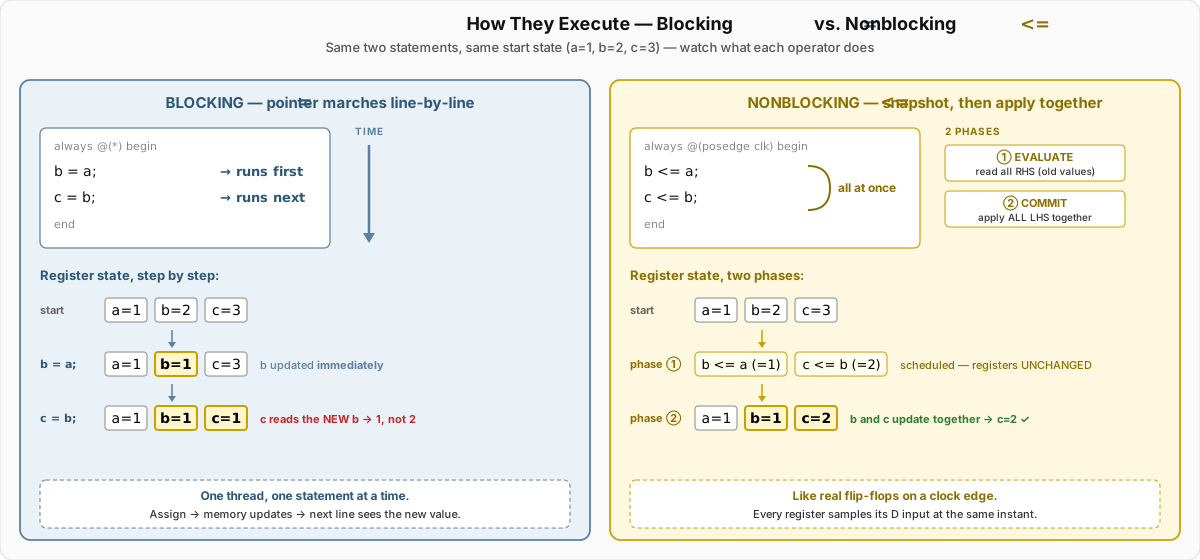
<= updates (q2 <= q1; q1 <= d;) shift data one stage per edge — a real shift register. Swap to = and q2 grabs the new q1, collapsing the pipeline. This is why <= is the rule in clocked blocks.
RTL: Count the Flip-Flops
always @(posedge clk) begin
    if (rst) begin
        q1 <= 0;        // ← FF #1
        q2 <= 0;        // ← FF #2
        cnt <= 0;       // ← FFs (one per bit of cnt)
    end else begin
        q1  <= d;
        q2  <= q1;      // shift-register stage
        cnt <= cnt + 1;
    end
end
Three <= targets ⇒ three storage elements. cnt is N flip-flops where N = bit-width.
▸ Phase 3 of 5 · ~70 min · You build
🛠 Assemble
From one FF to a visible blinker
Build Plan
- Ex 1 · 15 min D flip-flop — synchronous reset, posedge-only update. Sim first.
- Ex 2 · 15 min Loadable register — add
enandload. Implicit feedback when disabled. - Ex 3 · 15 min Free-running counter — N-bit up-counter with terminal-count output.
- Ex 4 · 20 min LED blinker — clock divider — 25 MHz ÷ 25 000 000 = 1 Hz. The first design where you can see hardware time.
D Flip-Flop — Canonical Form
module dff (
    input  wire clk, rst, d,
    output reg  q
);
    always @(posedge clk) begin
        if (rst) q <= 1'b0;
        else     q <= d;
    end
endmodule
Three lines of behavior. One flip-flop in the netlist. This is the atom of all sequential logic.
d to a button, clk to the 25 MHz pin. The LED reflects the button — but only at clock edges. Press fast — see the sampling.
LED Blinker — Hardware Time
module blinker (
    input  wire clk,            // 25 MHz from Go Board
    output reg  led
);
    localparam HALF_PERIOD = 12_500_000;   // 0.5 s
    reg [23:0] cnt;

    always @(posedge clk) begin
        if (cnt == HALF_PERIOD - 1) begin
            cnt <= 0;
            led <= ~led;
        end else begin
            cnt <= cnt + 1;
        end
    end
endmodule
24-bit counter (224 = 16 777 216 > 12 500 000). The toggle pattern is the canonical "slow event from a fast clock."
▸ Phase 4 of 5 · ~45 min · Verify · waveform · AI check
🛡 Fortify
Sequential logic earns sequential proof
Sim First — Waveforms Tell the Truth
cd labs/week1_day04/ex1_dff/starter
iverilog -o dff_tb dff.v dff_tb.v
vvp dff_tb           # generates dump.vcd
gtkwave dump.vcd # add clk, d, q to viewer- Does
qchange only on the rising edge ofclk? Look — don't assume. - Does
qsample the value ofdat the edge, not before or after? - Does reset force
qlow immediately on the next edge? - For the blinker: shrink
HALF_PERIODto 5 in sim — watch the counter wrap and the LED toggle.
🤖 Check the Machine (first time!)
Prompt: Ask an AI (ChatGPT, Claude, Copilot — pick one) to explain the difference between blocking (=) and nonblocking (<=) assignment in Verilog.
- Does the answer match what you learned? Where exactly is it imprecise?
- Does it warn about simulation-synthesis mismatch when you mix them?
- Does it explicitly say: "
=inalways @(*),<=inalways @(posedge clk)"? - Save the prompt + reply to your AI workflow portfolio (this is graded — 8% of the course).
Hardware Verification
- D-FF on board: press button rapidly — LED updates only on clock edges (you won't see flicker because 25 MHz >> eye).
- Loadable register: hold
enlow → output frozen even whendchanges. - Counter: wire bottom 4 bits to LEDs (a slow-clock version) — binary count visible.
- Blinker: ~1 Hz toggle on LED 0. Time it with a phone stopwatch — should be within ±1%.
▸ Phase 5 of 5 · ~10 min · Week 1 closes
🔗 Transfer
What four days bought you
Week 1 Recap
D1 Concurrent mental model. Toolchain. LED on hardware.
D2 Vectors, muxes, hierarchy. Adder + 7-seg decoder.
D3 Procedural combinational. Latch trap. First PPA compare. ALU.
D4 Clocked logic. RTL counting. You can now build any clocked digital circuit.
Weekend → Week 2 Prep
Monday is the merged D5+D6 session — counters + testbenches + the deep dive on AI-assisted verification.
Monday afternoon: Semidynamics visit — RISC-V vector processor startup, RTL meets commercial silicon.
This weekend
- 📺 Watch D5+D6 pre-class video (~90 min — merged)
- 📝 D5+D6 pre-class quiz
- 🇪🇸 Eat well · sleep · Montserrat photos welcome
🔗 End of Week 1 · Buen fin de semana
You can build any digital circuit.
Four days. Four working boards. One mental model that fits all of hardware.
Week 2: verification, AI, and the visits that show you why this matters.