🌍 Where This Lives
In Industry
The hex-to-7seg decoder is the canonical “Hello, World!” of digital design. It shows up in interview whiteboard problems, FPGA vendor demos, and the first chapter of every HDL textbook. Master it and you've crossed the threshold from theory to real hardware.
In This Course
Active-low logic, case statements, pin mapping — all three concepts land today. The case pattern shows up again in Topic 3 (ALU), Topic 7 (FSMs), Topic 11 (UART state logic). Pin mapping with .pcf files is every lab from now on.
⚠️ Active-Low: When 0 Means ON
❌ Wrong Model
“Of course 1 means ON. Drive the pin high to turn the segment on.”
✓ Right Model
On the Go Board, segments are wired as common-anode active-low. The LED's anode is tied to VCC; your FPGA pin pulls the cathode low to turn it on. 0 = ON. 1 = OFF. The comment block in every decoder file reminds you of this. Read it before you code.
~ once is better than rewriting every case.
⚡ Simplified Circuits: One Segment, Both Polarities
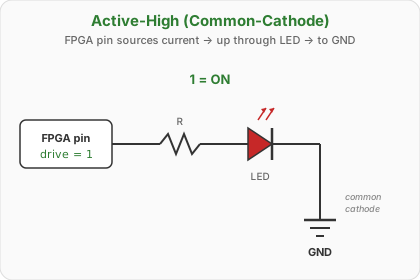
// Active-high: drive 1 to light segment a
assign o_seg_a = 1'b1;   // ON
// assign o_seg_a = 1'b0; // OFF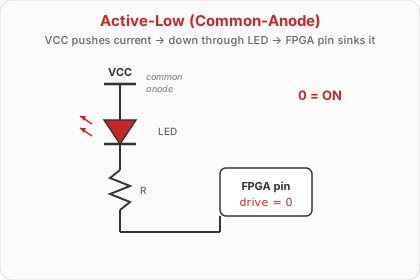
// Active-low: drive 0 to light segment a (Go Board)
assign o_seg_a = 1'b0;   // ON
// assign o_seg_a = 1'b1; // OFF1) draws essentially zero LED current — the default state is “off” with no current flowing through any segment. The same logic explains why resets, chip-selects, and button inputs are typically active-low: a pull-up to VCC plus a switch to GND is the cheapest, lowest-leakage default state.
🔍 How to Tell: Active-Low vs Active-High
Active-High (1 = ON)
Typical for common-cathode displays: cathodes tied to GND, FPGA pin sources current up through the LED. Logic mirrors light: 1 bit → segment glows.
Active-Low (0 = ON)
Typical for common-anode displays (and the Go Board): anodes tied to VCC, FPGA pin sinks current down through the LED. Logic is inverted: 0 bit → segment glows.
- Read the schematic. Trace one segment pin. If it goes through a resistor to the LED's cathode and the anode is on VCC → active-low. If anode-side and cathode is on GND → active-high.
- Read the constraints / pin file. Good
.pcf/.xdcfiles annotate it (ours does:# 7-Segment Display 1 (active low segments)). - Read the vendor's example code. If their top-level wraps the decoder with
~or!(e.g. Nandland'sassign o_Segment1_A = !w_Seg_A;), the board is active-low. - Read the part datasheet. Common-anode vs common-cathode is right on page 1.
- Empirical test. Drive one pin constant
0; if the segment lights, it's active-low. (Last resort — the schematic should never be a mystery.)
1 = on, 1 = pressed) — see Topic 1's buttons_to_leds. The 7-segment segments on the very same FPGA are active-low. Polarity is per-peripheral, not per-board.
7-Segment Display: Segment Map
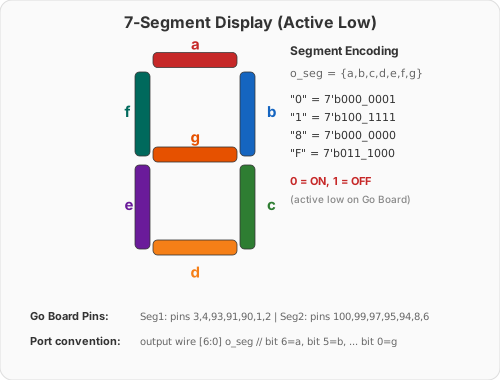
Convention: {a,b,c,d,e,f,g} MSB→LSB
a = top, then clockwise: b, c, d, e, f, g = middle
Go Board wiring: 0 = ON, 1 = OFF
So “0” digit = 7'b0000001 (all segments on except g)
👁️ I Do — Derive “3” From Scratch
Signals: i_hex is the 4-bit input nibble (the value 0–F we want to display); o_seg is the 7-bit output bus {a,b,c,d,e,f,g} driving the segments active-low. Full module declaration appears two slides ahead.
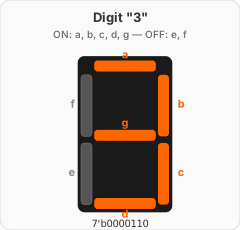
{a,b,c,d,e,f,g} — MSB → LSB
Digit “3” lights segments: a, b, c, d, g.
Segments OFF: e, f.
Order:  a b c d e f g
Active: 1 1 1 1 0 0 1   ← logical
Pins:   0 0 0 0 1 1 0   ← active-low (flipped)
case (i_hex)
// ...
4'h3: o_seg = 7'b0000110;
// abcdefg
// 0000110 = ON:abcd,g OFF:e,f
// ...
endcase🤝 We Do — Fill in “5” and “A”
case (i_hex)
    4'h5: o_seg = 7'b???????;  // segments: a, c, d, f, g (ON)
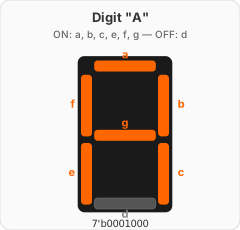
    4'hA: o_seg = 7'b???????;  // segments: a, b, c, e, f, g (ON)
endcase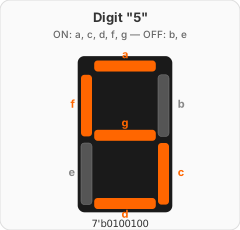
4'h5 = 7'b0100100 (ON:a,c,d,f,g → logical 1011011 → active-low 0100100).
4'hA = 7'b0001000 (ON:a,b,c,e,f,g → logical 1110111 → active-low 0001000).
default:. If any bit of i_hex is X (unknown), no 4'h0–4'hF literal matches, o_seg is left unassigned in always @(*), and the synthesizer infers a latch. Always include default: o_seg = 7'b1111111; (all off).
{a,b,c,d,e,f,g} — MSB → LSB
The Full Decoder
module hex_to_7seg (
    input  wire [3:0] i_hex,
    output reg  [6:0] o_seg     // {a,b,c,d,e,f,g} active-low
);
always @(*) begin
    case (i_hex)             //     abcdefg
        4'h0: o_seg = 7'b0000001;  // 0
        4'h1: o_seg = 7'b1001111;  // 1
        4'h2: o_seg = 7'b0010010;  // 2
        4'h3: o_seg = 7'b0000110;  // 3
        4'h4: o_seg = 7'b1001100;  // 4
        4'h5: o_seg = 7'b0100100;  // 5
        4'h6: o_seg = 7'b0100000;  // 6
        4'h7: o_seg = 7'b0001111;  // 7
        4'h8: o_seg = 7'b0000000;  // 8 (all ON)
        4'h9: o_seg = 7'b0000100;  // 9
        4'hA: o_seg = 7'b0001000;  // A
        4'hB: o_seg = 7'b1100000;  // b (lower)
        4'hC: o_seg = 7'b0110001;  // C
        4'hD: o_seg = 7'b1000010;  // d (lower)
        4'hE: o_seg = 7'b0110000;  // E
        4'hF: o_seg = 7'b0111000;  // F
        default: o_seg = 7'b1111111;  // all OFF (safety)
    endcase
end
endmodule🧪 You Do — Before the Demo
Predict (don't peek at the table):
- Does this module use any flip-flops?
- Approximately how many LUTs does Yosys build?
- If you accidentally write
o_seg = 7'b1111111for4'h0, what will you see?
{a,b,c,d,e,f,g} — MSB → LSB
Flash the Decoder to the Go Board
~5 minutes — real hardware
▸ COMMANDS
cd lecture_examples/week1_day02/d02_s4_ex3/
make sim      # iverilog testbench
make wave     # GTKWave — confirm all 16 digits
make prog     # yosys → nextpnr → iceprog
# Board flashes: you're on hardware now.
▸ EXPECTED RESULT
PASS: all 16 digits verified
=== 16 passed, 0 failed ===

[make prog]
Yosys 0.36 → synth_ice40
nextpnr-ice40 → hx1k vq100
icepack → iceprog
FPGA programmed OK.
▸ ON THE BOARD
Set switches SW1-SW4 to encode a hex digit (binary, LSB=SW1). Watch the leftmost 7-segment display change. Try: 0000 shows “0,” 1111 shows “F,” 1010 shows “A.”
🔧 What Did the Tool Build?
$ yosys -p "read_verilog hex_to_7seg.v; \
    synth_ice40 -top hex_to_7seg; stat" -q

=== hex_to_7seg ===

   Number of wires:                  8
   Number of cells:                  7
     SB_DFF                          0
     SB_LUT4                         7
7 LUT4s — one per output bit:
- Each output is a 4-input boolean function (the 16-entry case)
- LUT4 has exactly 4 inputs — perfect match
- No flops: combinational
- Total area: 0.5% of the iCE40 HX1K
This is the optimal implementation. The LUT4 was practically designed for this problem.
🤖 Check the Machine
Ask AI: “Generate a hex-to-7-segment decoder in Verilog for the Nandland Go Board.”
TASK
Ask AI for a complete decoder module.
BEFORE
Predict: AI will produce a case statement. Key question: will it be active-low?
AFTER
Many AIs produce the active-high version silently — ignoring the “Go Board” hint. Test: flash it.
TAKEAWAY
AI-generated HDL needs hardware-specific validation. Always flash-test.
Key Takeaways
① 7-segment: 4-bit hex in, 7-bit segment pattern out.
② Go Board is active-low: 0 = ON, 1 = OFF.
③ Each output bit is a 4-input function → maps to one SB_LUT4.
④ Always include default. Always flash-test, don't just sim.
Pre-Class Self-Check
Pause and try each before revealing.
Q1: Does reg always synthesize to a register?
reg in always @(*) = combinational. Only reg in always @(posedge clk) becomes a flip-flop.Q2: What is 4'hF in binary, and why can't you just write 15?
4'b1111. Writing bare 15 makes it a 32-bit value, causing silent width mismatches on assignment.Pre-Class Self-Check (cont.)
Q3: On the Go Board, how do you turn segment a ON?
0. Active-low: 0 = ON, 1 = OFF.Q4: If your decoder's case is missing default, what happens?
default protects you in larger designs — always include it.🔗 End of Topic 2
Tomorrow: Procedural Combinational Logic
Topic 3 · always @(*), if/else, case, and the latch trap
▸ WHY THIS MATTERS NEXT
You just used always @(*) and case without really understanding them. Topic 3 is the formal treatment — including the latch problem, the #1 silent bug in combinational RTL. By tomorrow's end you'll recognize latch-inducing patterns on sight, and know three independent ways to prevent them.