🌍 Where This Lives
Where it shows up
Every elevator call button. Every keyboard key you have ever pressed. Every car key fob, microwave keypad, garage door clicker, TV remote, ATM keypad, and the emergency-stop on every industrial machine. The mechanical world is loud: when two pieces of metal touch, they don't stay touching — they chatter for 5–20 milliseconds before settling. A single press is a brief burst of noise.
When it goes wrong
A passenger taps the call button once and the elevator dutifully queues “floor 7, floor 12, floor 3, floor 23, close door” and lurches nowhere. A driver pushes start once and the ECU sees seven presses. Industrial panels with un-filtered inputs have triggered emergency stops on an accidental brush. Every shipped product with a physical input has either solved this or had to issue a recall.
⚠️ Buttons Don't Just Close — They Ring
❌ Wrong Model
“I press the button, the signal goes from 0 to 1, stays at 1 until I release. My edge detector sees one rising edge per press.”
✓ Right Model
The mechanical contacts bounce on impact — making and breaking the circuit rapidly for 5–20 ms. Put a scope on a button: you'll see a burst of transitions before the signal settles. At 25 MHz, that's 125,000 to 500,000 false edges from a single press.
👁️ I Do — The Counter-Based Debouncer
module debounce #(parameter CLKS_STABLE = 500_000) (  // 20ms @ 25MHz
    input  wire i_clk, i_reset, i_noisy,
    output reg  o_clean
);
    reg [$clog2(CLKS_STABLE)-1:0] r_count;

    always @(posedge i_clk) begin
        if (i_reset) begin
            r_count <= 0;
            o_clean <= 1'b0;
        end else if (i_noisy != o_clean) begin
            // input differs from stable output — start/continue counting
            if (r_count == CLKS_STABLE - 1) begin
                o_clean <= i_noisy;        // persisted long enough, accept
                r_count <= 0;
            end else begin
                r_count <= r_count + 1'b1;
            end
        end else begin
            r_count <= 0;                   // bounced back — reset counter
        end
    end
endmodule🔧 Debouncer — RTL View
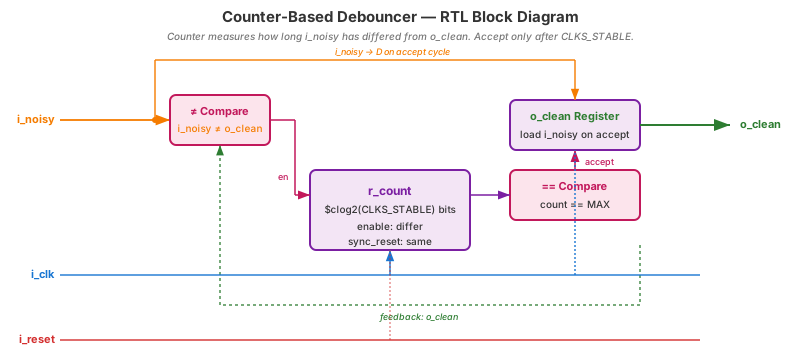
≠ comparator gates the counter — it only ticks when input differs from stable output, (2) the persistence counter, (3) the terminal-count comparator triggers a one-shot “accept” that latches i_noisy into o_clean. Bounces force the input to match o_clean again, which resets the counter.
📘 Quick Primer — What's a State Machine?
We haven't formally covered finite state machines yet — Topic 7 does that in depth. But the next slide reads the debouncer as an FSM, so a 60-second primer:
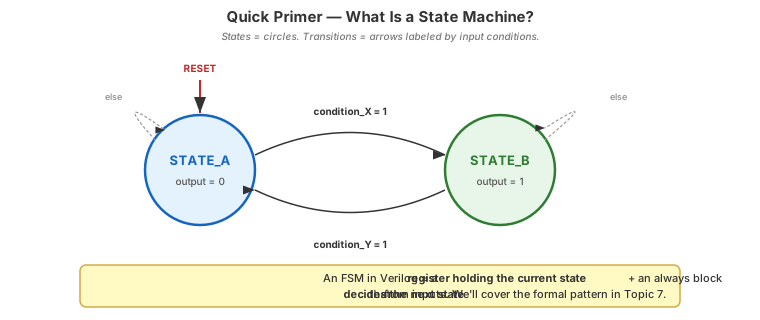
States (circles): the modes your design can be in. Each state typically produces a specific output.
Transitions (arrows): labeled by the input condition that triggers a state change on the clock edge. If no labeled condition matches, the FSM stays put (self-loop).
Reset: a special arrow pointing to the start state — where the FSM lives at i_reset = 1.
Implementation: one register holds the state; one combinational block computes the next state from (state, inputs). That's it. Topic 7 will formalize the coding patterns.
Debouncer as a State Machine
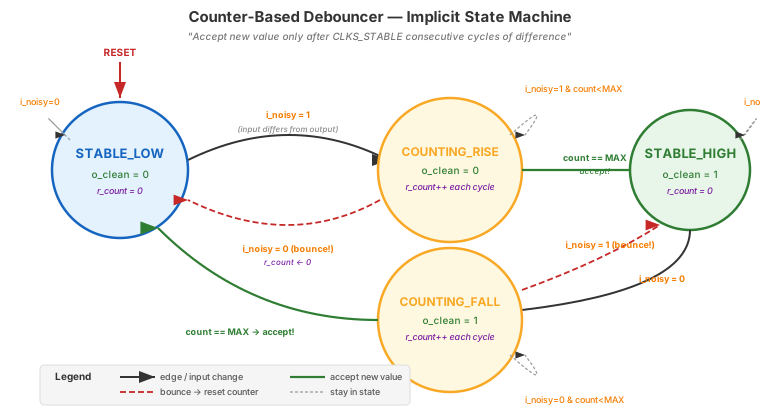
count == MAX (green path → accept). A bounce drops back to i_noisy = previous (red dashed → reset counter). The 4-line always block on the previous slide is exactly this graph.
🤝 We Do — The Complete Input Pipeline
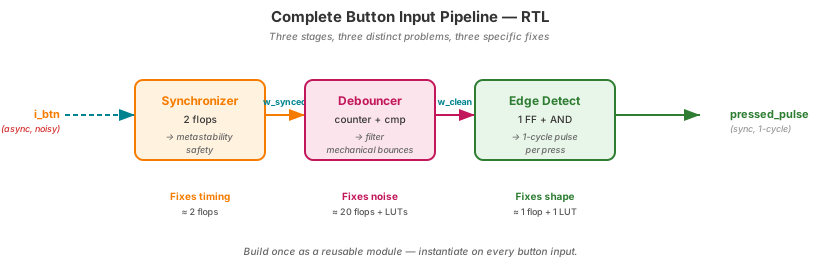
//  i_btn  →  [2-FF sync]  →  [debouncer]  →  [edge detect]  →  pressed_pulse
//  (raw)      (metastable      (filter         (1-cycle
//              safety)          bounces)        pulse per press)

wire w_synced, w_clean;
reg  r_clean_d1;

synchronizer u_sync (.i_clk(clk), .i_async_in(i_btn),    .o_sync_out(w_synced));
debounce     u_deb  (.i_clk(clk), .i_reset(rst), .i_noisy(w_synced), .o_clean(w_clean));

always @(posedge clk) r_clean_d1 <= w_clean;
wire pressed_pulse = w_clean & ~r_clean_d1; // rising-edge detect🔧 Input Pipeline — RTL View
🧪 You Do — Size the Counter
You want a 10 ms debounce window on a 12 MHz clock. What's CLKS_STABLE and the required counter width?
CLKS_STABLE = 12,000,000 × 0.010 = 120,000. Width = $clog2(120,000) = 17 bits. Verify: 2^17 = 131,072 ≥ 120,000. ✓
Debouncer on the Go Board
~5 minutes — real button, real bounces
▸ COMMANDS
cd lecture_examples/week2_day05/d05_s4_ex4/
make sim       # TB injects simulated bounces
make wave
make prog      # flash to Go Board
# Press SW1 — watch counter on LEDs
▸ EXPECTED BEHAVIOR
Without debounce:
  press SW1 once → counter +3, +7
  (bounces cause multiple inc)

With debounce:
  press SW1 once → counter +1
  (clean single increment)
▸ GTKWAVE
Signals: i_noisy · r_count · o_clean · pressed_pulse. Watch the counter climb during noise, reset on each bounce, finally hit terminal count and assert o_clean. pressed_pulse is a clean 1-cycle pulse — the “one press” event your FSM wants.
🔧 What Did the Tool Build?
$ yosys -p "read_verilog day05_ex04_debounce.v; synth_ice40 -top debounce; stat" -q

=== debounce ===  (CLKS_STABLE = 500000, width = $clog2(500000) = 19)
   Number of wires:                 30
   Number of cells:                 37
     SB_CARRY                       18
     SB_DFFESR                      20    ← 19 counter + 1 clean output
SB_LUT4 9generate to instantiate an array without copy-paste.)
🤖 Check the Machine
Ask AI: “Design a debouncer for a 100 Hz clock and 10 ms debounce. Then explain why we also need a synchronizer in front of it.”
TASK
Debouncer + justify sync upstream.
BEFORE
Predict: CLKS_STABLE=1. 1-bit counter. Sync still needed because button is async.
AFTER
AI should explain: debouncer ≠ synchronizer. Different problems, different fixes.
TAKEAWAY
A common AI error: conflating the two. Both are needed, in series.
Key Takeaways
① Mechanical switches bounce for 5–20 ms. Filter them out.
② Counter-based debouncer: accept new value only after persistent stability.
③ Full input pipeline = sync → debounce → edge detect.
④ Build once, reuse on every button input.
Pre-Class Self-Check
Q1: Why isn't a synchronizer alone enough for a button?
Q2: At 25 MHz with CLKS_STABLE = 250_000, what's the debounce window in ms?
250,000 / 25,000,000 = 10 ms.Pre-Class Self-Check (cont.)
Q3: Where does the edge-detector go in the pipeline?
Q4: Could you debounce with a FIFO of samples instead of a counter?
🔗 End of Topic 5
Next Topic: Testbenches
Topic 6 · Writing the tests that protect your designs
▸ WHY THIS MATTERS NEXT
You've been running make sim all week and trusting PASS/FAIL reports. Someone wrote those testbenches for you. Topic 6 is when you start writing them yourself. Verification is larger than design at most ASIC companies — you're about to learn the craft that makes real silicon work.